
How It Works
The ArchBlocks libraries are organized into categories of single .DWG files to take advantage of AutoCAD's Design Center feature. The blocks are not created as individual .DWG files, but are grouped in "categories" of blocks, such as Chairs. All the Chair blocks are in one .DWG file called "Chairs.dwg". This way in Design Center, you find the one "Chair.dwg" select it, click on "Blocks", and all the chair block previews in that .DWG file are quickly displayed. Using AutoCAD's Design Center helps you to organize, manage, preview, and insert blocks much faster than just using AutoCAD's "Insert" command. Plus, you don't have 100's if not 1000's of individual block files to manage anymore. Design Center is a content management feature that is in all the latest versions of AutoCAD including the current AutoCAD 2018, and AutoCADLT 2018.
Watch an 11 minute video tutorial with AutoCAD on how ArchBlocks.com CAD block
libraries work with AutoCAD's Design Center.
To view the video click below;
Below is a screen capture from AutoCAD 2018 with Design Center opened up to display how the ArchBlocks.com libraries work within AutoCAD Design Center.
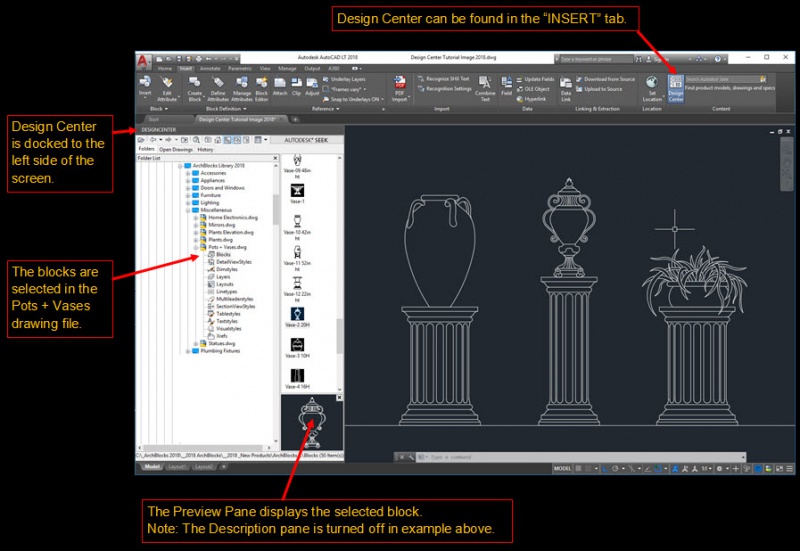
The library categories are listed as folders, within the folders will be drawing files that are specific to that category. As in the folder for Appliances, there will drawing files such as Washer and Dryers, Refrigerators, Range Tops, etc.
Within each of the drawings are block definitions that will display in Design Center when the Blocks icon is selected. All the blocks will then be displayed just to the right of the folder list.
From here you can scroll up or down to view all the block previews. When you find the block you want you can drag and drop it into the drawing window, or double click it, to bring up the Insert dialog where you can make more adjustments for inserting, such as Scale and Rotation.
The ArchBlocks libraries are designed to work within all versions AutoCAD and are saved in AutoCAD 2000 .DWG format. If you are using a different CAD software and would like DXF files of the library, contact us. Some of the answers to the questions that might arise reading this How It Works page may be answered in the FAQ information. Downloading and installation instructions are in the FAQ, and on the Download Instructions page.
ArchBlocks.com will always be adding new CAD block libraries and CAD symbols with the latest appliances, autos, plumbing fixtures, CAD electrical symbols, and design elements, so your architectural drawings will never have out of date symbols. See the CAD block Products Page for all the details.
Our AutoCAD blocks, AutoCAD title blocks and AutoCAD symbols are professionally designed to reflect the level of expertise you want and need in your AutoCAD drawings. No matter if you're searching for AutoCAD block people, tree symbols or CAD furniture blocks, ArchBlocks CAD library can provide you with current high-end AutoCAD symbols to complete your professional AutoCAD drawings.
You can search this website to view the entire line of ArchBlock's Products. Our AutoCAD symbols include Doors & Windows Blocks, Plumbing Fixtures Blocks, Furniture Blocks, Electrical Blocks, Appliances Blocks, Lighting Blocks, Miscellaneous Blocks and Title Blocks. You can also purchase any or all of our AutoCAD blocks using our Buy Now feature. Please search through our FAQ page to find out more about the ArchBlock's AutoCAD library. For more information on our company, visit About Us or Contact Us today for further assistance. Thank you for your interest in ArchBlocks CAD library. We look forward to serving all of your creative AutoCAD design needs.
Support
We offer free technical support for any questions that you might have about our products. Contact us and we will be glad to answer any concerns you may have on the downloading, installation, and use of our products.