New from Autodesk Blog Learning is and overview of how to use blocks in AutoCAD 2022. Be sure to check it out by clicking on the link below… How to Work With Blocks in AutoCAD If you have any questions about using blocks in AutoCAD, or AutoCAD LT, please send me a note. Regards, Kevin
All new AutoCAD symbols for electric cars and trucks block library now available at ArchBlocks.com. There have been several car and truck manufacturers that are coming out with some very cool electric cars and trucks. ArchBlocks.com now offers a new library of late model electric cars and trucks which include plan views, side views, front and rear views, and 3/4 front and rear views.
Click on the link below to take you directly to the new CAD blocks library;
All new AutoCAD symbols for electric cars and trucks block library now available at ArchBlocks.com. There have been several car and truck manufacturers that are coming out with some very cool electric cars and trucks. ArchBlocks.com now offers a new library of late model electric cars and trucks which include plan views, side views, front […]
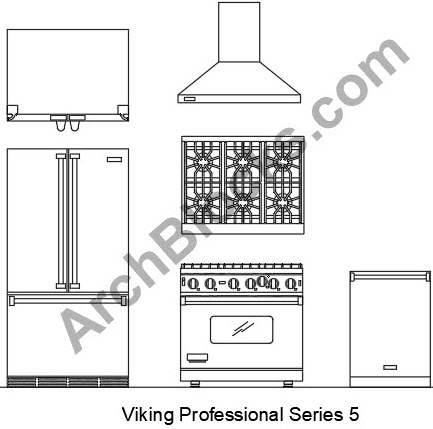
New for AutoCAD 2020 we’ve added kitchen appliance sets to one of our top selling CAD block libraries, the ArchBlocks Appliance Library. Now you can select a set of matching major brand appliances for your kitchen CAD design projects! This will save you time trying to search for individual appliance AutoCAD blocks that are a matching set.
AutoCAD Kitchen Appliance Sets CAD Symbols
To check out this new addition to our Appliance Library of CAD blocks just click on the link below..
New for AutoCAD 2020 we’ve added kitchen appliance sets to one of our top selling CAD block libraries, the ArchBlocks Appliance Library. Now you can select a set of matching major brand appliances for your kitchen CAD design projects! This will save you time trying to search for individual appliance AutoCAD blocks that are a […]
The ArchBlocks.com website first launched on August 1st, 2007. I am pleased to announce an all new redesigned and updated website that launched August 1st, 2019! There is also a new logo to go with the new website design as seen below…
I’m very excited with the new modern website design and will be adding new products and updating others . It’s been a great 12 years and I want to thank all the wonderful customers that have supported this website. I look forward to many more years of offering great products and excellent customer service.
Send me a note and tell me what you think of the new website!
The ArchBlocks.com website first launched on August 1st, 2007. I am pleased to announce an all new redesigned and updated website that launched August 1st, 2019! There is also a new logo to go with the new website design as seen below… I’m very excited with the new modern website design and will be adding […]
Here is a great article on whats new in AutoCAD 2020 from Edwin Prakoso at CADNOTES.com Click on the link below… https://www.cad-notes.com/autocad-2020-whats-new/ Have a great day! Kevin
AutoCAD 2020 is now available from Autodesk. You can subscribe for the full version of AutoCAD 2020 at a 20% discount till April 30th for $1,288.00 per year.
The educational license is also now available to download for free if you are a student, or an educator.
To download the current version of AutoCAD 2020 click on the link below;
AutoCAD 2020 is now available from Autodesk. You can subscribe for the full version of AutoCAD 2020 at a 20% discount till April 30th for $1,288.00 per year. The educational license is also now available to download for free if you are a student, or an educator. To download the current version of AutoCAD 2020 […]




 Read More →